> ## Documentation Index
> Fetch the complete documentation index at: https://docs.softisp.ug/llms.txt
> Use this file to discover all available pages before exploring further.
# Agent List
> View and manage all your resellers
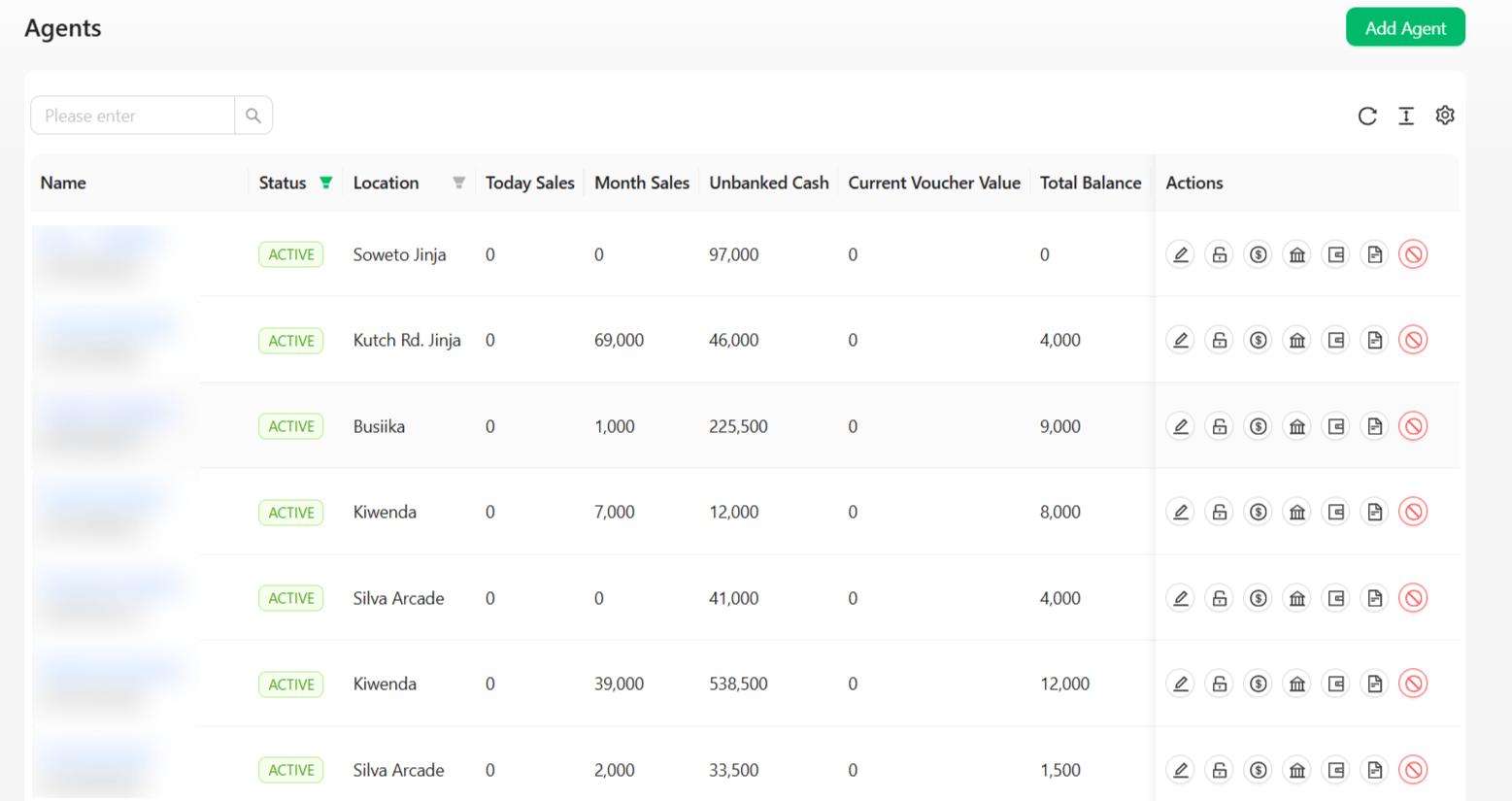 Agents are resellers or distributors who sell internet services on your behalf. This page lists every agent registered on your platform.
## Columns
| Column | Description |
| --------------------- | --------------------------------------------------------- |
| Name | Agent business/personal name |
| Status | Active / Inactive |
| Location | Assigned service area |
| Today Sales | Revenue this agent has collected today |
| Month Sales | Revenue this agent has collected this month |
| Unbanked Cash | Cash collected but not yet deposited to a bank account |
| Current Voucher Value | Value of unredeemed vouchers currently held by this agent |
| Total Balance | The agent's overall wallet/commission balance |
Use the search box to filter by agent, and the column filters on **Status** and **Location** to narrow the list further.
## Row actions
Each row has a row of icon actions on the right:
Agents are resellers or distributors who sell internet services on your behalf. This page lists every agent registered on your platform.
## Columns
| Column | Description |
| --------------------- | --------------------------------------------------------- |
| Name | Agent business/personal name |
| Status | Active / Inactive |
| Location | Assigned service area |
| Today Sales | Revenue this agent has collected today |
| Month Sales | Revenue this agent has collected this month |
| Unbanked Cash | Cash collected but not yet deposited to a bank account |
| Current Voucher Value | Value of unredeemed vouchers currently held by this agent |
| Total Balance | The agent's overall wallet/commission balance |
Use the search box to filter by agent, and the column filters on **Status** and **Location** to narrow the list further.
## Row actions
Each row has a row of icon actions on the right:
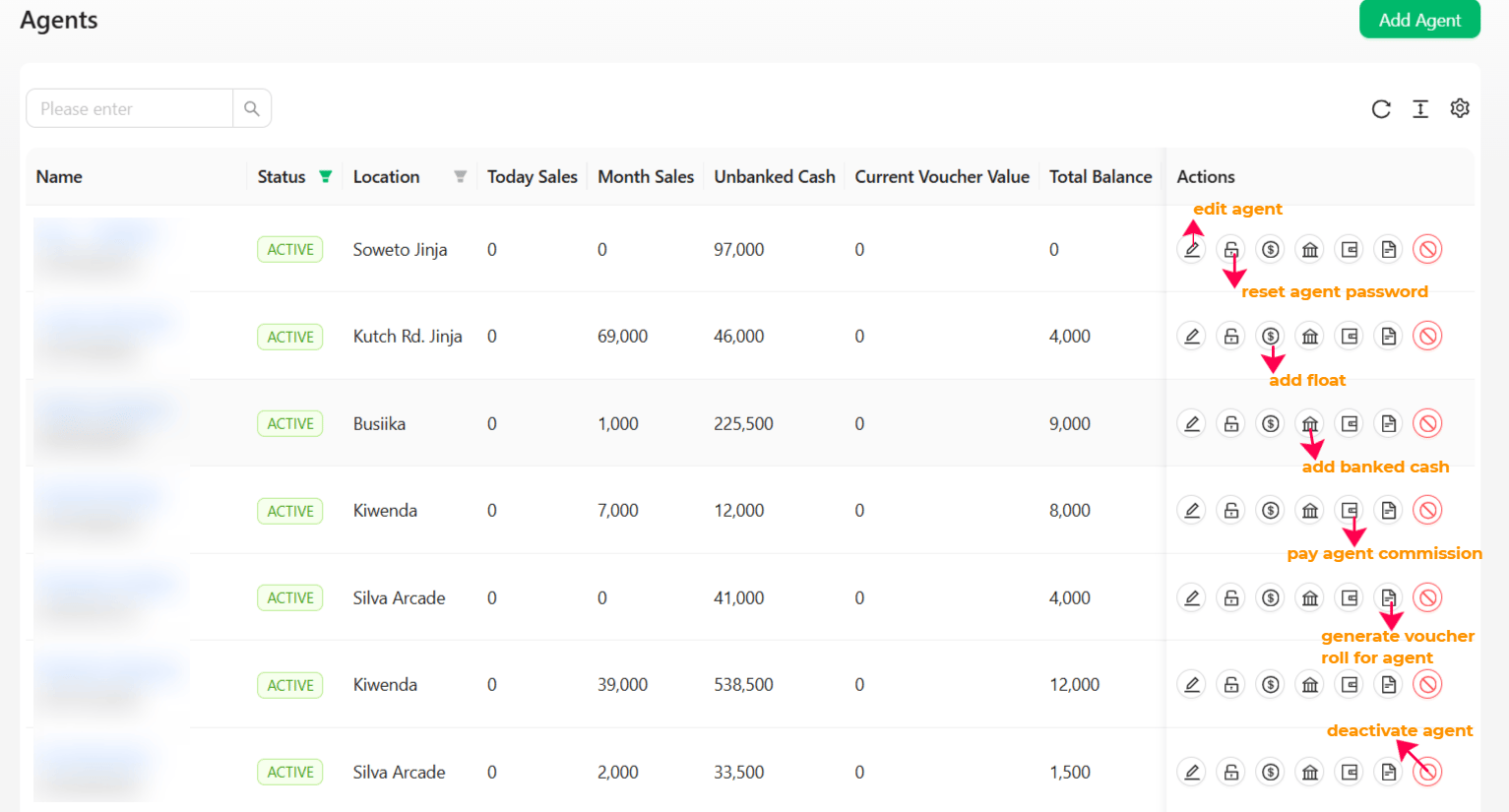 | Icon | Action | Description |
| ------------ | ----------------------------------- | ----------------------------------------------------------- |
| Pencil | **Edit agent** | Update the agent's profile details |
| Lock | **Reset agent password** | Generate a new login password for this agent |
| `$` | **Add float** | Top up the agent's float/wallet balance |
| Building | **Add banked cash** | Record cash this agent has physically deposited to the bank |
| Document | **Pay agent commission** | Settle commission owed to this agent |
| Page | **Generate voucher roll for agent** | Create a new batch of vouchers assigned to this agent |
| Circle-slash | **Deactivate agent** | Suspend the agent's account |
Click into an agent's name to see their full profile, customers, payments, and performance — see [Agent Detail](/agents/agent-detail).
## Creating an agent
Click the **Add Agent** button in the top right of the Agents page.
| Icon | Action | Description |
| ------------ | ----------------------------------- | ----------------------------------------------------------- |
| Pencil | **Edit agent** | Update the agent's profile details |
| Lock | **Reset agent password** | Generate a new login password for this agent |
| `$` | **Add float** | Top up the agent's float/wallet balance |
| Building | **Add banked cash** | Record cash this agent has physically deposited to the bank |
| Document | **Pay agent commission** | Settle commission owed to this agent |
| Page | **Generate voucher roll for agent** | Create a new batch of vouchers assigned to this agent |
| Circle-slash | **Deactivate agent** | Suspend the agent's account |
Click into an agent's name to see their full profile, customers, payments, and performance — see [Agent Detail](/agents/agent-detail).
## Creating an agent
Click the **Add Agent** button in the top right of the Agents page.
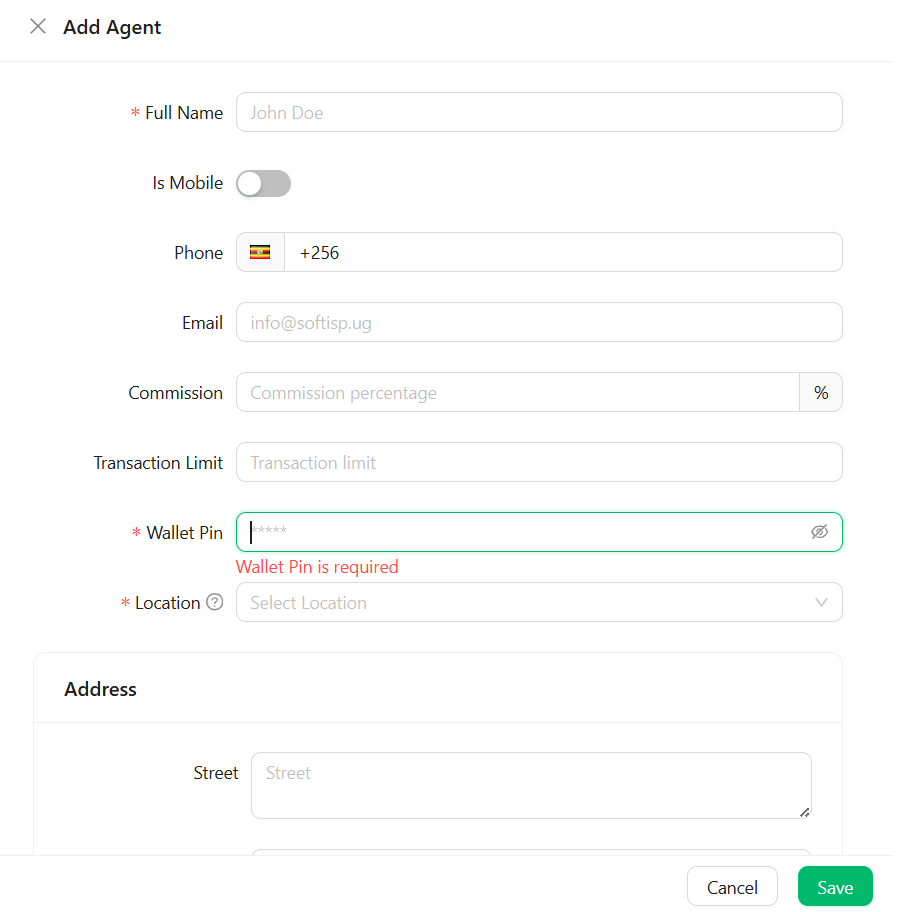 | Field | Description |
| ----------------- | ------------------------------------------------------------------------------------ |
| **Full Name**\* | The agent's business or personal name |
| Is Mobile | Toggle on if this agent operates a mobile/roaming setup rather than a fixed location |
| Phone | Contact number, including country code (e.g. `+256`) |
| Email | The agent's email address |
| Commission | The commission percentage this agent earns on sales |
| Transaction Limit | The maximum transaction value this agent can process |
| **Wallet Pin**\* | A PIN used to authorize wallet transactions for this agent |
| **Location**\* | The service area this agent is assigned to |
| Address | The agent's street address and related fields |
Click **Save** to create the agent.
Fields marked with an asterisk (\*) — Full Name, Wallet Pin, and Location — are required. The form won't save without them.
| Field | Description |
| ----------------- | ------------------------------------------------------------------------------------ |
| **Full Name**\* | The agent's business or personal name |
| Is Mobile | Toggle on if this agent operates a mobile/roaming setup rather than a fixed location |
| Phone | Contact number, including country code (e.g. `+256`) |
| Email | The agent's email address |
| Commission | The commission percentage this agent earns on sales |
| Transaction Limit | The maximum transaction value this agent can process |
| **Wallet Pin**\* | A PIN used to authorize wallet transactions for this agent |
| **Location**\* | The service area this agent is assigned to |
| Address | The agent's street address and related fields |
Click **Save** to create the agent.
Fields marked with an asterisk (\*) — Full Name, Wallet Pin, and Location — are required. The form won't save without them.