> ## Documentation Index
> Fetch the complete documentation index at: https://docs.softisp.ug/llms.txt
> Use this file to discover all available pages before exploring further.
# Collection Accounts
> Manage collection accounts for receiving payments (Cash, Mobile Money and Bank)
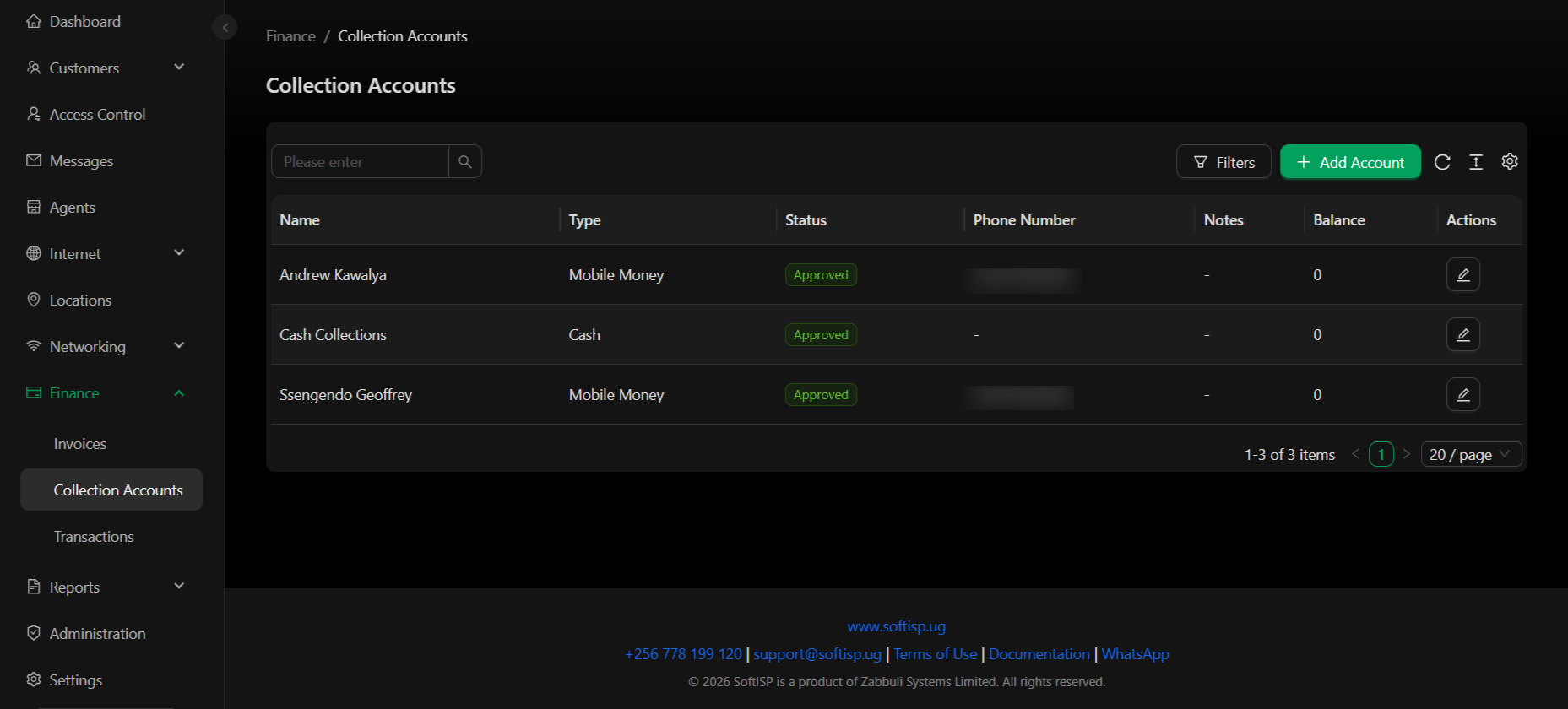 Collection accounts are where your customers send payments. You can set up three types of collection accounts: Cash, Mobile Money, and Bank accounts.
## Dashboard Columns
| Column | Description |
| ---------------- | ----------------------------------------------- |
| **Name** | Collection account name |
| **Type** | Account type: Cash, Mobile Money, or Bank |
| **Status** | Approved / Pending / Rejected |
| **Phone Number** | Phone for Mobile Money accounts; "-" for others |
| **Notes** | Any notes added to the account |
| **Balance** | Current balance in the collection account |
| **Actions** | Edit account details (pencil icon) |
## Collection Account Types
### Cash Collection
Simple cash collection account for tracking physical cash received.
Collection accounts are where your customers send payments. You can set up three types of collection accounts: Cash, Mobile Money, and Bank accounts.
## Dashboard Columns
| Column | Description |
| ---------------- | ----------------------------------------------- |
| **Name** | Collection account name |
| **Type** | Account type: Cash, Mobile Money, or Bank |
| **Status** | Approved / Pending / Rejected |
| **Phone Number** | Phone for Mobile Money accounts; "-" for others |
| **Notes** | Any notes added to the account |
| **Balance** | Current balance in the collection account |
| **Actions** | Edit account details (pencil icon) |
## Collection Account Types
### Cash Collection
Simple cash collection account for tracking physical cash received.
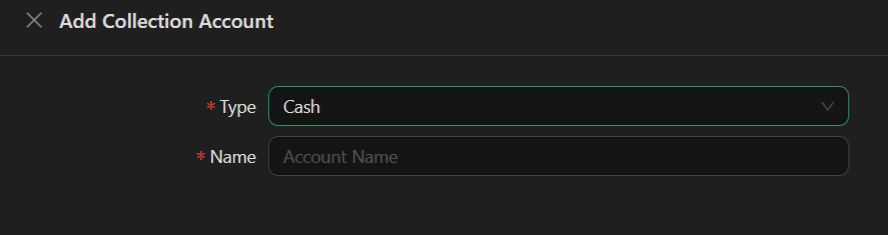 **Fields:**
* **Type** – Cash
* **Name** – Account name (e.g., "Main Cash Box")
### Mobile Money Collection
Receive payments via mobile money providers (e.g., MTN Mobile Money, Airtel Money).
**Fields:**
* **Type** – Cash
* **Name** – Account name (e.g., "Main Cash Box")
### Mobile Money Collection
Receive payments via mobile money providers (e.g., MTN Mobile Money, Airtel Money).
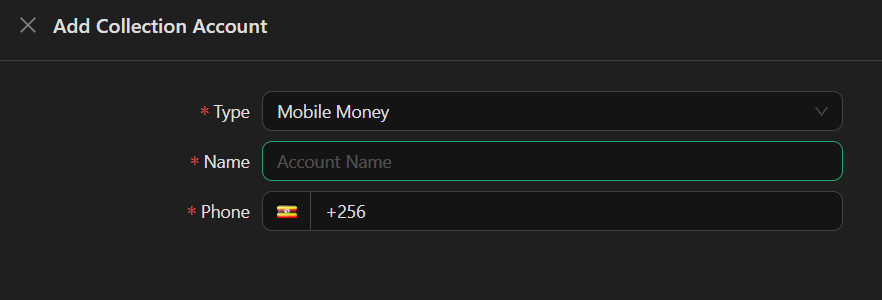 **Fields:**
* **Type** – Mobile Money
* **Name** – Account name (e.g., "John Doe")
* **Phone** – Mobile money account phone number (country code + number, e.g., +256...)
### Bank Account Collection
Receive payments directly to a bank account.
**Fields:**
* **Type** – Mobile Money
* **Name** – Account name (e.g., "John Doe")
* **Phone** – Mobile money account phone number (country code + number, e.g., +256...)
### Bank Account Collection
Receive payments directly to a bank account.
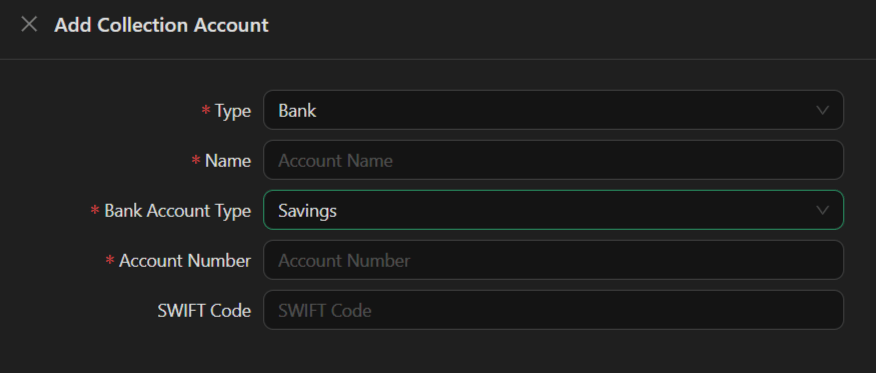 **Fields:**
* **Type** – Bank
* **Name** – Account name
* **Bank Account Type** – Savings / Checking / Business (dropdown)
* **Account Number** – Bank account number
* **SWIFT Code** – Bank SWIFT/BIC code (optional)
## Account Status
* **Approved** – Account is active and can receive payments
* **Pending** – Account awaiting approval
* **Rejected** – Account cannot receive payments
## Actions
* **Add Account** – Create a new Cash, Mobile Money, or Bank collection account
* **Edit** – Update account details
* **View Balance** – Check current account balance
* **Filter** – Filter by status, type, or search by name
Only approved collection accounts can receive customer payments. Ensure all account details are correct before request for approval.
Collection accounts receive payments from customers. For transferring funds between collection accounts and your bank, see [Transactions](/finance/transactions).
**Fields:**
* **Type** – Bank
* **Name** – Account name
* **Bank Account Type** – Savings / Checking / Business (dropdown)
* **Account Number** – Bank account number
* **SWIFT Code** – Bank SWIFT/BIC code (optional)
## Account Status
* **Approved** – Account is active and can receive payments
* **Pending** – Account awaiting approval
* **Rejected** – Account cannot receive payments
## Actions
* **Add Account** – Create a new Cash, Mobile Money, or Bank collection account
* **Edit** – Update account details
* **View Balance** – Check current account balance
* **Filter** – Filter by status, type, or search by name
Only approved collection accounts can receive customer payments. Ensure all account details are correct before request for approval.
Collection accounts receive payments from customers. For transferring funds between collection accounts and your bank, see [Transactions](/finance/transactions).