> ## Documentation Index
> Fetch the complete documentation index at: https://docs.softisp.ug/llms.txt
> Use this file to discover all available pages before exploring further.
# Transactions
> Monitor collection account balances, payment logs and withdrawal history
## Tabs Overview
The Transactions page includes four tabs for tracking different aspects of your financial flow:
### Balances
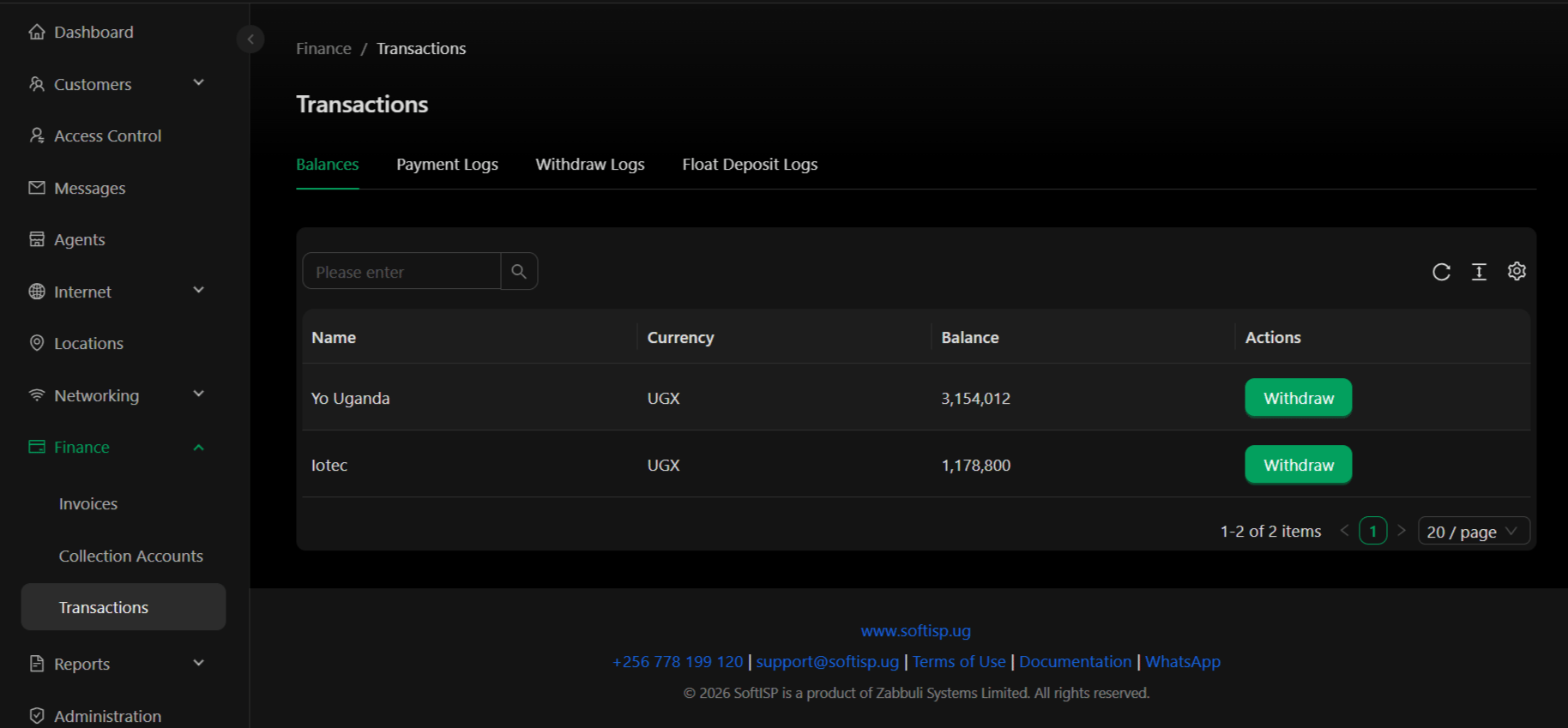
View current balances in all your collection accounts (Cash, Mobile Money, Bank).
 **Columns:**
| Column | Description |
| ------------ | ---------------------------------------------------- |
| **Name** | Collection account name (e.g., "Yo Uganda", "Iotec") |
| **Currency** | Account currency (UGX, USD, etc.) |
| **Balance** | Current available balance in the account |
| **Actions** | Initiate a withdrawal from this account |
**Actions:**
* **Withdraw** – Transfer funds from collection account to a bank account or get cash. Click the "Withdraw" button to initiate a withdrawal request.
***
### Payment Logs
Complete history of all payments received from customers, including payment method, amount, and charges.
**Columns:**
| Column | Description |
| ------------ | ---------------------------------------------------- |
| **Name** | Collection account name (e.g., "Yo Uganda", "Iotec") |
| **Currency** | Account currency (UGX, USD, etc.) |
| **Balance** | Current available balance in the account |
| **Actions** | Initiate a withdrawal from this account |
**Actions:**
* **Withdraw** – Transfer funds from collection account to a bank account or get cash. Click the "Withdraw" button to initiate a withdrawal request.
***
### Payment Logs
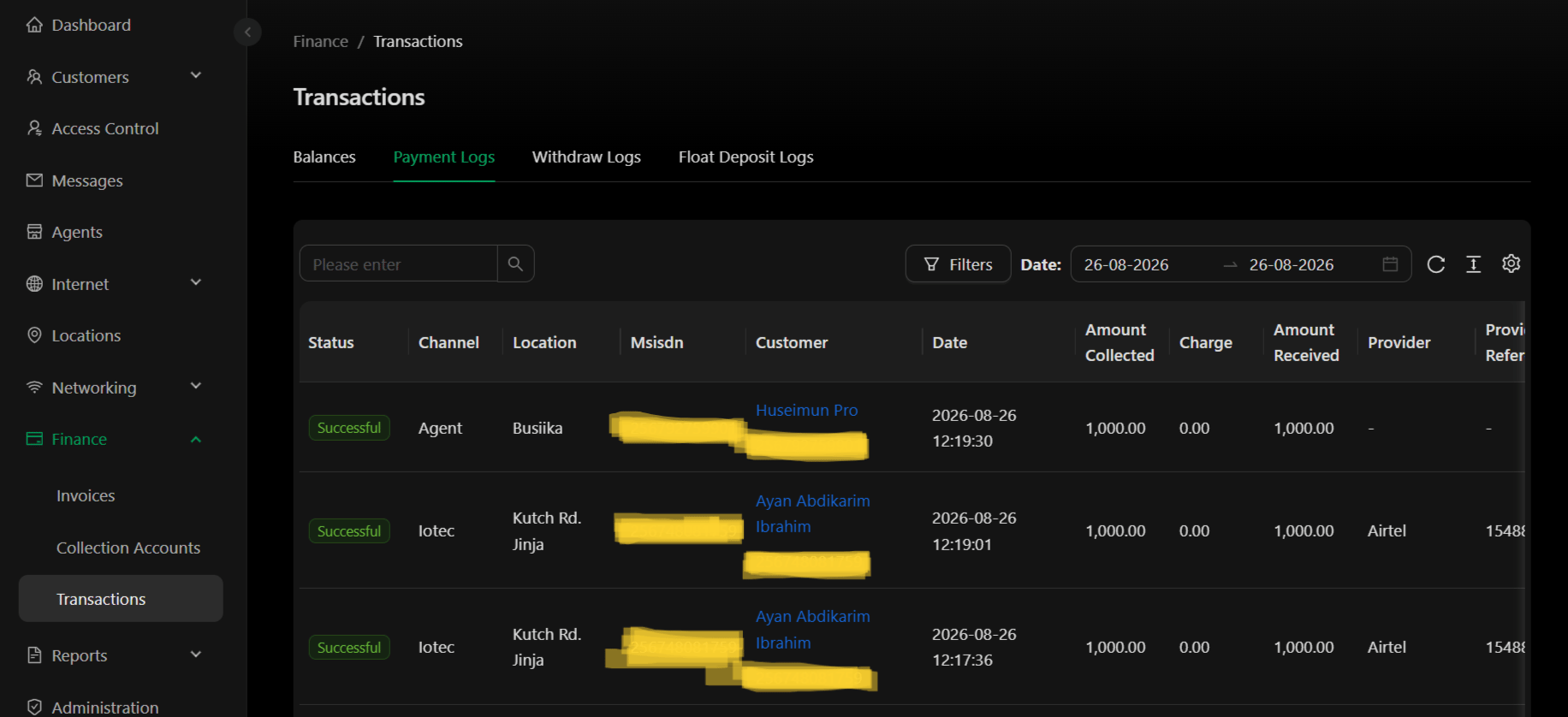
Complete history of all payments received from customers, including payment method, amount, and charges.
 **Columns:**
| Column | Description |
| -------------------- | ------------------------------------------------------------- |
| **Status** | Payment status: Successful, Failed, Pending |
| **Channel** | Payment method: Agent, Iotec, Mobile Money provider, etc. |
| **Location** | Location where payment was collected |
| **Msisdn** | Customer phone number or payment account identifier |
| **Customer** | Customer name or ID |
| **Date** | Payment date and time (YYYY-MM-DD HH:MM:SS) |
| **Amount Collected** | Gross amount received from customer |
| **Charge** | Transaction fee or charge deducted |
| **Amount Received** | Net amount after charges |
| **Provider** | Payment provider (Airtel, MTN, etc.) or "-" if not applicable |
| **Provi Refer** | Provider's transaction reference number |
***
### Withdraw Logs
History of all withdrawals and transfers from collection accounts.
**Columns:**
| Column | Description |
| -------------------- | ------------------------------------------------------------- |
| **Status** | Payment status: Successful, Failed, Pending |
| **Channel** | Payment method: Agent, Iotec, Mobile Money provider, etc. |
| **Location** | Location where payment was collected |
| **Msisdn** | Customer phone number or payment account identifier |
| **Customer** | Customer name or ID |
| **Date** | Payment date and time (YYYY-MM-DD HH:MM:SS) |
| **Amount Collected** | Gross amount received from customer |
| **Charge** | Transaction fee or charge deducted |
| **Amount Received** | Net amount after charges |
| **Provider** | Payment provider (Airtel, MTN, etc.) or "-" if not applicable |
| **Provi Refer** | Provider's transaction reference number |
***
### Withdraw Logs
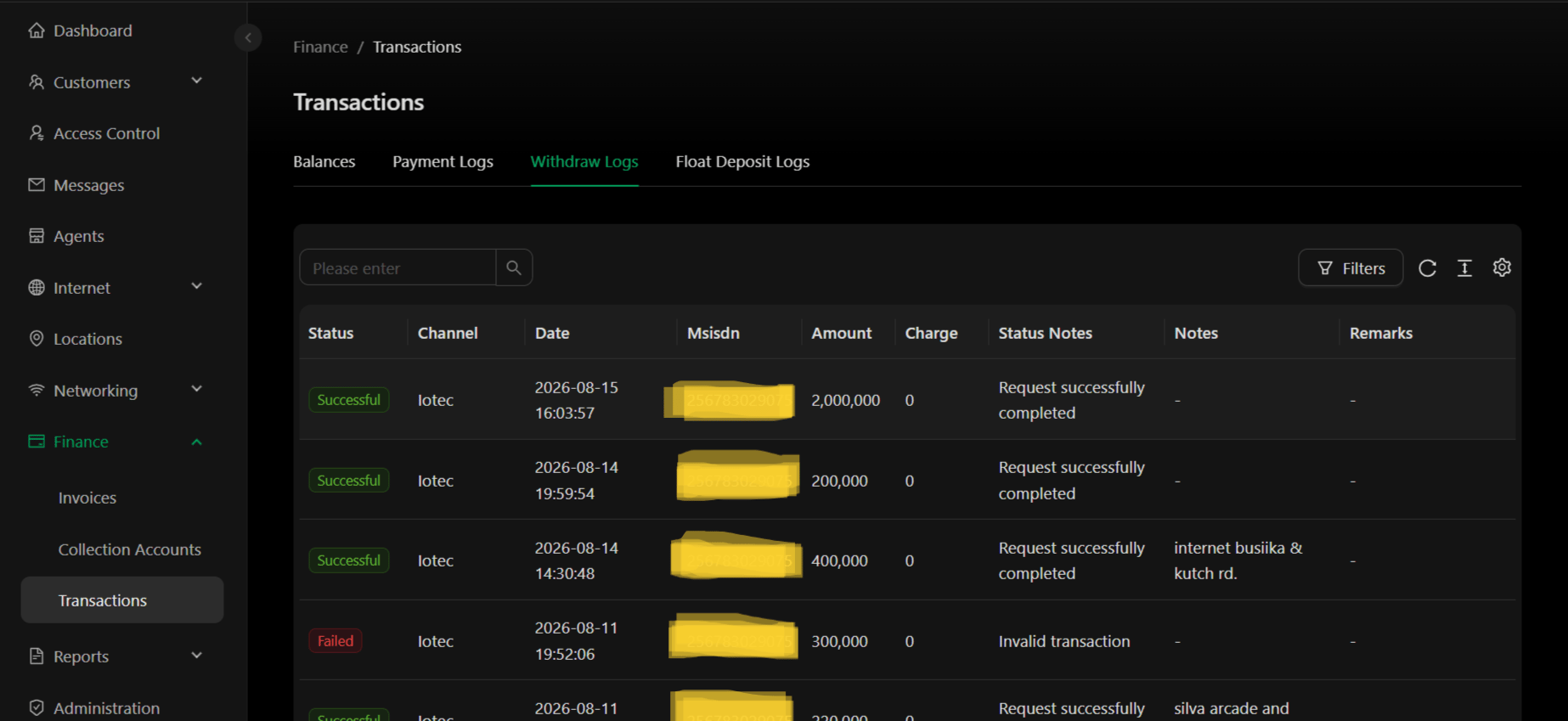
History of all withdrawals and transfers from collection accounts.
 **Columns:**
| Column | Description |
| ---------------- | ---------------------------------------------------------------------------------- |
| **Status** | Withdrawal status: Successful, Failed, Pending, In Progress |
| **Channel** | Collection account source (Iotec, Cash, Mobile Money, etc.) |
| **Date** | Withdrawal request date and time (YYYY-MM-DD HH:MM:SS) |
| **Msisdn** | Source account identifier or phone number |
| **Amount** | Withdrawal amount |
| **Charge** | Transfer fee or charge deducted |
| **Status Notes** | Additional details (e.g., "Request successfully completed", "Invalid transaction") |
| **Notes** | Admin notes or comments about the withdrawal |
| **Remarks** | Additional remarks or location information |
***
## Key Concepts
**Collection Account Balances** – Current funds available in each collection account. Use the Withdraw button to move money to your bank account or to get cash.
**Payment Logs** – Every customer payment is logged here. Track which channel (agent, provider, location) received each payment and any fees charged.
**Withdrawals** – Transfers from collection accounts to your bank account/cash. View the history and status of all withdrawal requests.
**Statuses:**
* **Successful** – Transaction completed successfully
* **Failed** – Transaction could not be completed
* **Pending** – Awaiting processing
* **In Progress** – Currently being processed
## Actions
* **View Balances** – Check available funds in all collection accounts
* **Initiate Withdrawal** – Click "Withdraw" button to transfer funds from a collection account to your bank
* **Filter Transactions** – Filter by date, status, channel, or amount
* **Export Logs** – Export payment or withdrawal logs to Excel
* **View Details** – Click on a transaction row for detailed information
Payment Logs show incoming customer payments. Withdraw Logs show outgoing transfers to your bank. Use the Balances tab to see funds available for withdrawal.
Withdrawals move real money between accounts. Ensure withdrawal details are correct before submitting a request. Only approved collection accounts can receive money.
**Columns:**
| Column | Description |
| ---------------- | ---------------------------------------------------------------------------------- |
| **Status** | Withdrawal status: Successful, Failed, Pending, In Progress |
| **Channel** | Collection account source (Iotec, Cash, Mobile Money, etc.) |
| **Date** | Withdrawal request date and time (YYYY-MM-DD HH:MM:SS) |
| **Msisdn** | Source account identifier or phone number |
| **Amount** | Withdrawal amount |
| **Charge** | Transfer fee or charge deducted |
| **Status Notes** | Additional details (e.g., "Request successfully completed", "Invalid transaction") |
| **Notes** | Admin notes or comments about the withdrawal |
| **Remarks** | Additional remarks or location information |
***
## Key Concepts
**Collection Account Balances** – Current funds available in each collection account. Use the Withdraw button to move money to your bank account or to get cash.
**Payment Logs** – Every customer payment is logged here. Track which channel (agent, provider, location) received each payment and any fees charged.
**Withdrawals** – Transfers from collection accounts to your bank account/cash. View the history and status of all withdrawal requests.
**Statuses:**
* **Successful** – Transaction completed successfully
* **Failed** – Transaction could not be completed
* **Pending** – Awaiting processing
* **In Progress** – Currently being processed
## Actions
* **View Balances** – Check available funds in all collection accounts
* **Initiate Withdrawal** – Click "Withdraw" button to transfer funds from a collection account to your bank
* **Filter Transactions** – Filter by date, status, channel, or amount
* **Export Logs** – Export payment or withdrawal logs to Excel
* **View Details** – Click on a transaction row for detailed information
Payment Logs show incoming customer payments. Withdraw Logs show outgoing transfers to your bank. Use the Balances tab to see funds available for withdrawal.
Withdrawals move real money between accounts. Ensure withdrawal details are correct before submitting a request. Only approved collection accounts can receive money.