> ## Documentation Index
> Fetch the complete documentation index at: https://docs.softisp.ug/llms.txt
> Use this file to discover all available pages before exploring further.
# Packages
> Define the internet service plans you sell to customers
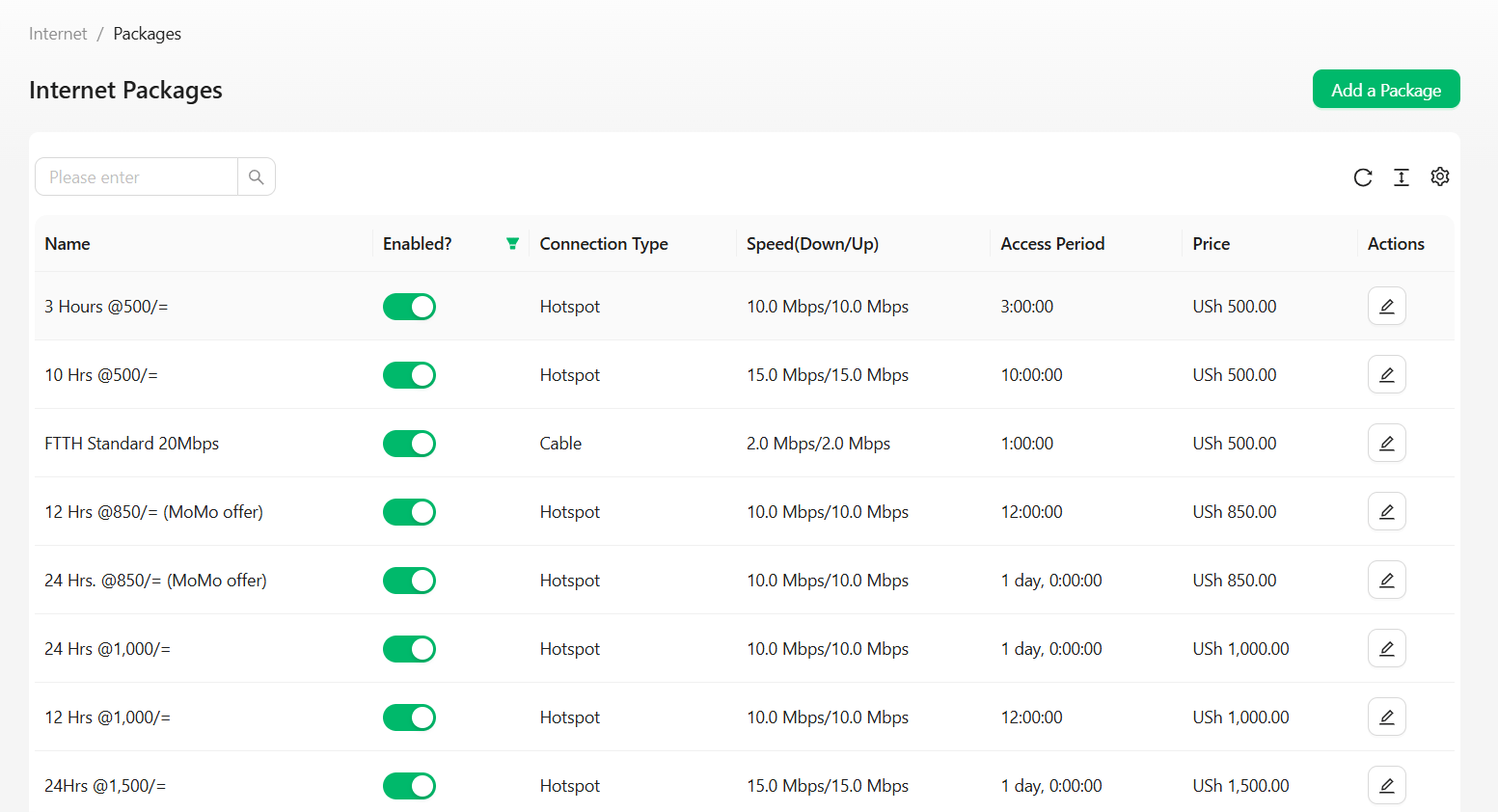 Internet packages define the service plans you sell to customers — speed, price, duration, and more.
## Package attributes
| Field | Description |
| -------------- | ---------------------------------------- |
| Name | Package name (e.g. "Home 10Mbps") |
| Download Speed | Maximum download bandwidth |
| Upload Speed | Maximum upload bandwidth |
| Price | Billing amount |
| Duration | Validity period (daily, weekly, monthly) |
| FUP Rule | Linked Fair Usage Policy (optional) |
| Profile Type | PPPoE, DHCP, Hotspot |
| Location | Applicable service area |
## Creating a package
This assumes you've already created an account on SoftISP and created a [Location](/locations/locations) — a package won't save without one. You'll also need at least one payment method enabled (Agent, Mobile Money, or Wallet) so customers can actually buy internet through the package.
On the Packages page (reachable on **Internet** in the left menu), click **Add Package** on the top right.
Internet packages define the service plans you sell to customers — speed, price, duration, and more.
## Package attributes
| Field | Description |
| -------------- | ---------------------------------------- |
| Name | Package name (e.g. "Home 10Mbps") |
| Download Speed | Maximum download bandwidth |
| Upload Speed | Maximum upload bandwidth |
| Price | Billing amount |
| Duration | Validity period (daily, weekly, monthly) |
| FUP Rule | Linked Fair Usage Policy (optional) |
| Profile Type | PPPoE, DHCP, Hotspot |
| Location | Applicable service area |
## Creating a package
This assumes you've already created an account on SoftISP and created a [Location](/locations/locations) — a package won't save without one. You'll also need at least one payment method enabled (Agent, Mobile Money, or Wallet) so customers can actually buy internet through the package.
On the Packages page (reachable on **Internet** in the left menu), click **Add Package** on the top right.
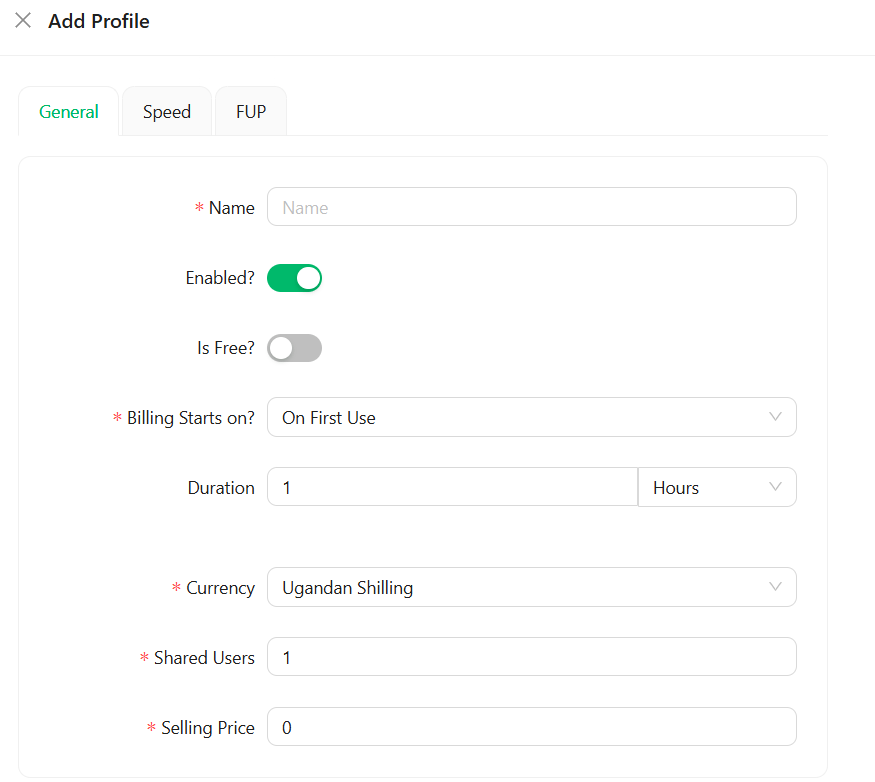 Pay attention to every red-star field:
* **Name** — a meaningful name for the package
* **Enabled?** — turn on (if disabled, the package won't show on the splash page for customers to buy)
* **Is Free?** — leave this off unless you're creating a [free package](#creating-a-free-package)
* **Billing Starts On?** — choose **On First Use** for hotspot packages, or **On Payment** for PPPoE/cable customers
* **Duration** — a whole number plus its unit. This determines how long the customer stays connected after purchase, after which they're automatically disconnected
* **Currency** — your country's currency
* **Shared Users** — `1` for a single device; increase this if you want multiple devices to share the package simultaneously
* **Selling Price** — the price of this package
Pay attention to every red-star field:
* **Name** — a meaningful name for the package
* **Enabled?** — turn on (if disabled, the package won't show on the splash page for customers to buy)
* **Is Free?** — leave this off unless you're creating a [free package](#creating-a-free-package)
* **Billing Starts On?** — choose **On First Use** for hotspot packages, or **On Payment** for PPPoE/cable customers
* **Duration** — a whole number plus its unit. This determines how long the customer stays connected after purchase, after which they're automatically disconnected
* **Currency** — your country's currency
* **Shared Users** — `1` for a single device; increase this if you want multiple devices to share the package simultaneously
* **Selling Price** — the price of this package
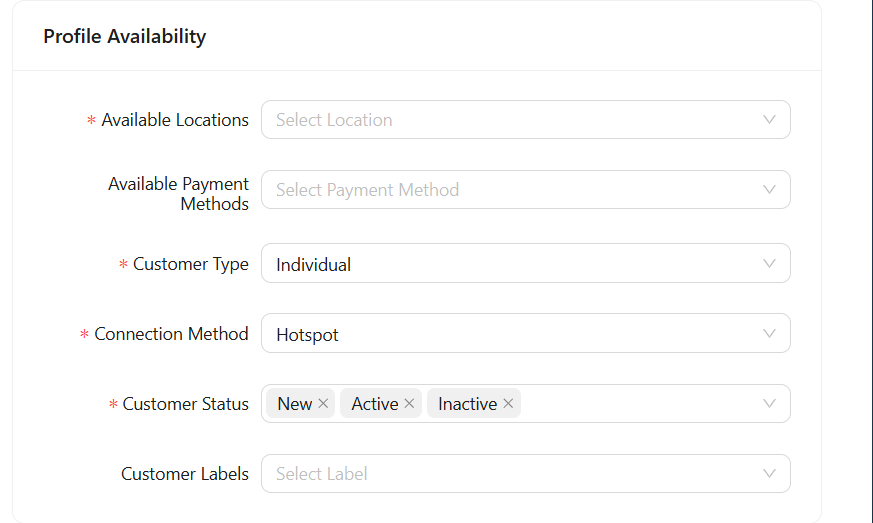 * **Available Locations** — the hotspot locations where this package should be available
* **Days Availability** — all days are selected by default; narrow this down to specific days and time ranges if needed
* **Available Locations** — the hotspot locations where this package should be available
* **Days Availability** — all days are selected by default; narrow this down to specific days and time ranges if needed
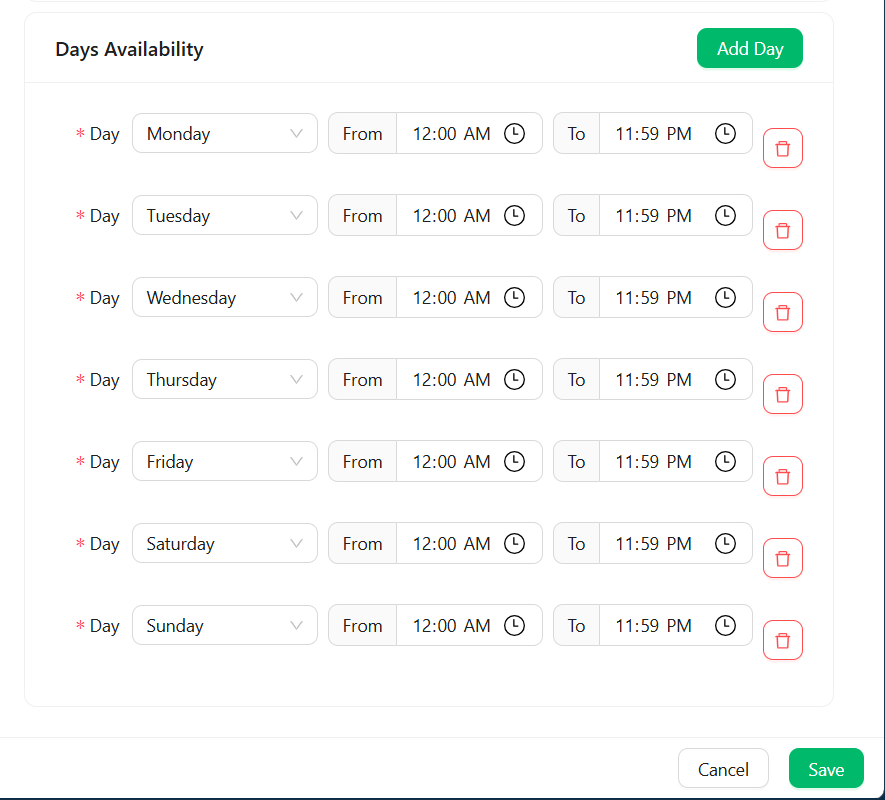 Click **Save** to close the form.
All red-star fields must be filled in, or the form won't save.
## Creating a free package
There are times you need to give free internet access to your WiFi users right at the captive portal login screen — for example a free trial window, or a promotional period.
### 1. Enable the Free Trial payment method
On the left menu, click **Settings** → **Payment Gateways**.
Click **Add Payment Method**, then on Payment Gateway select **Free Trial**.
* **Currency** — select your country's currency
* **Locations** — select the locations where you want the free package to work
Click **Save** to save the changes.
See [Access Control](/customers/accesscontrol) for the broader MAC-based access control feature this builds on.
## Actions
Create, Edit, Duplicate, Delete, or Assign an FUP Rule to a package.
Link a [Fair Usage Policy](/internet/fairusagepolicies) to automatically throttle customers after they cross a data threshold, instead of cutting them off entirely.
Click **Save** to close the form.
All red-star fields must be filled in, or the form won't save.
## Creating a free package
There are times you need to give free internet access to your WiFi users right at the captive portal login screen — for example a free trial window, or a promotional period.
### 1. Enable the Free Trial payment method
On the left menu, click **Settings** → **Payment Gateways**.
Click **Add Payment Method**, then on Payment Gateway select **Free Trial**.
* **Currency** — select your country's currency
* **Locations** — select the locations where you want the free package to work
Click **Save** to save the changes.
See [Access Control](/customers/accesscontrol) for the broader MAC-based access control feature this builds on.
## Actions
Create, Edit, Duplicate, Delete, or Assign an FUP Rule to a package.
Link a [Fair Usage Policy](/internet/fairusagepolicies) to automatically throttle customers after they cross a data threshold, instead of cutting them off entirely.