> ## Documentation Index
> Fetch the complete documentation index at: https://docs.softisp.ug/llms.txt
> Use this file to discover all available pages before exploring further.
# Devices
> Manage your MikroTik routers, switches and access points
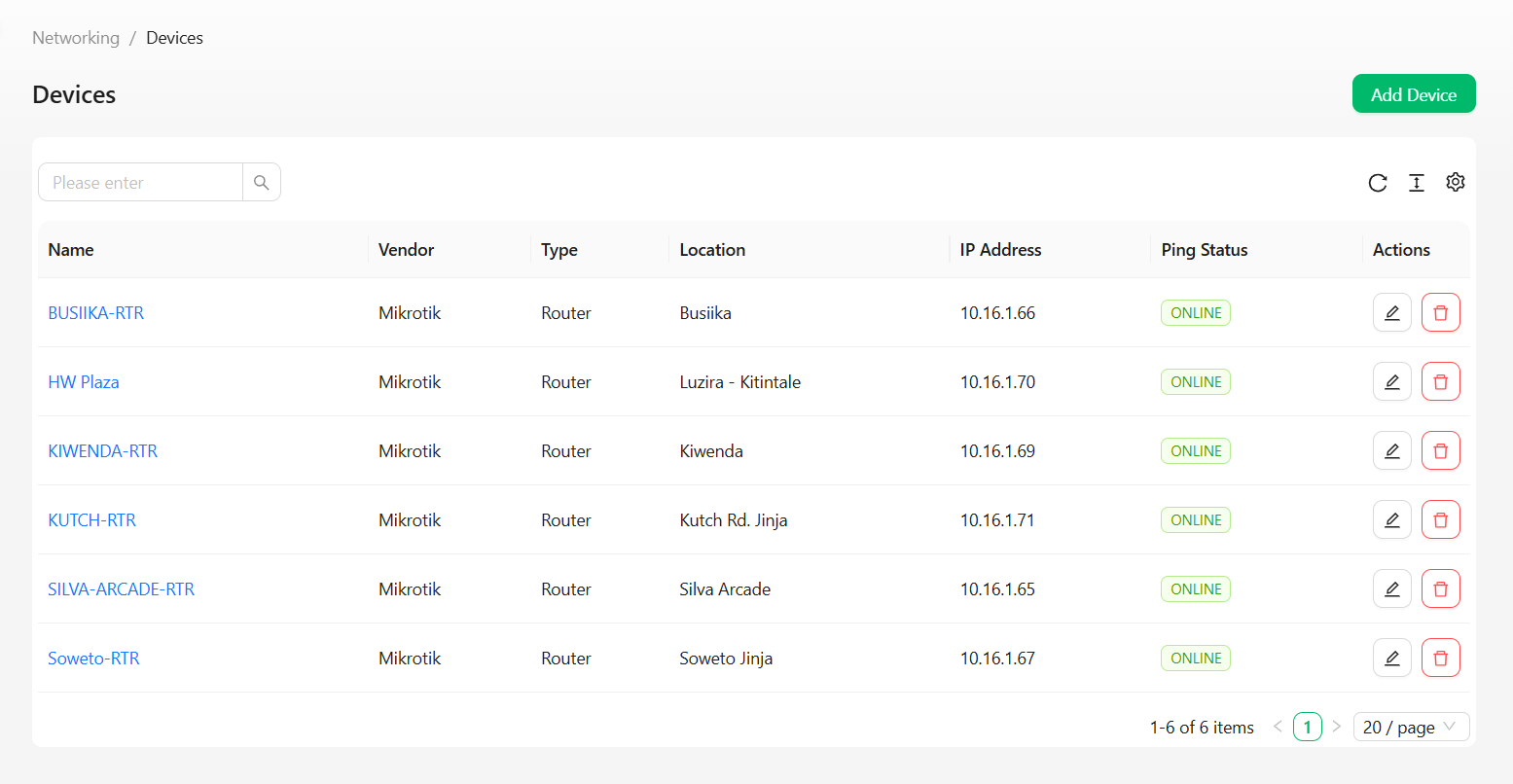 Manage all network access devices — MikroTik routers, switches and access points — from one place.
## Columns
| Column | Description |
| ----------- | ----------------------------------------------- |
| Name | Device label — click through to open the device |
| Vendor | The device manufacturer (e.g. Mikrotik) |
| Type | Router, Switch, AP |
| Location | Where the device is deployed |
| IP Address | Management IPv4 address |
| Ping Status | ONLINE / OFFLINE — live reachability status |
Use the search box to filter by device.
## Row actions
| Icon | Action | Description |
| ------ | ---------- | --------------------------------- |
| Pencil | **Edit** | Update the device's configuration |
| Trash | **Delete** | Remove the device |
## Creating a device
Click the **Add Device** button in the top right of the Devices page.
Manage all network access devices — MikroTik routers, switches and access points — from one place.
## Columns
| Column | Description |
| ----------- | ----------------------------------------------- |
| Name | Device label — click through to open the device |
| Vendor | The device manufacturer (e.g. Mikrotik) |
| Type | Router, Switch, AP |
| Location | Where the device is deployed |
| IP Address | Management IPv4 address |
| Ping Status | ONLINE / OFFLINE — live reachability status |
Use the search box to filter by device.
## Row actions
| Icon | Action | Description |
| ------ | ---------- | --------------------------------- |
| Pencil | **Edit** | Update the device's configuration |
| Trash | **Delete** | Remove the device |
## Creating a device
Click the **Add Device** button in the top right of the Devices page.
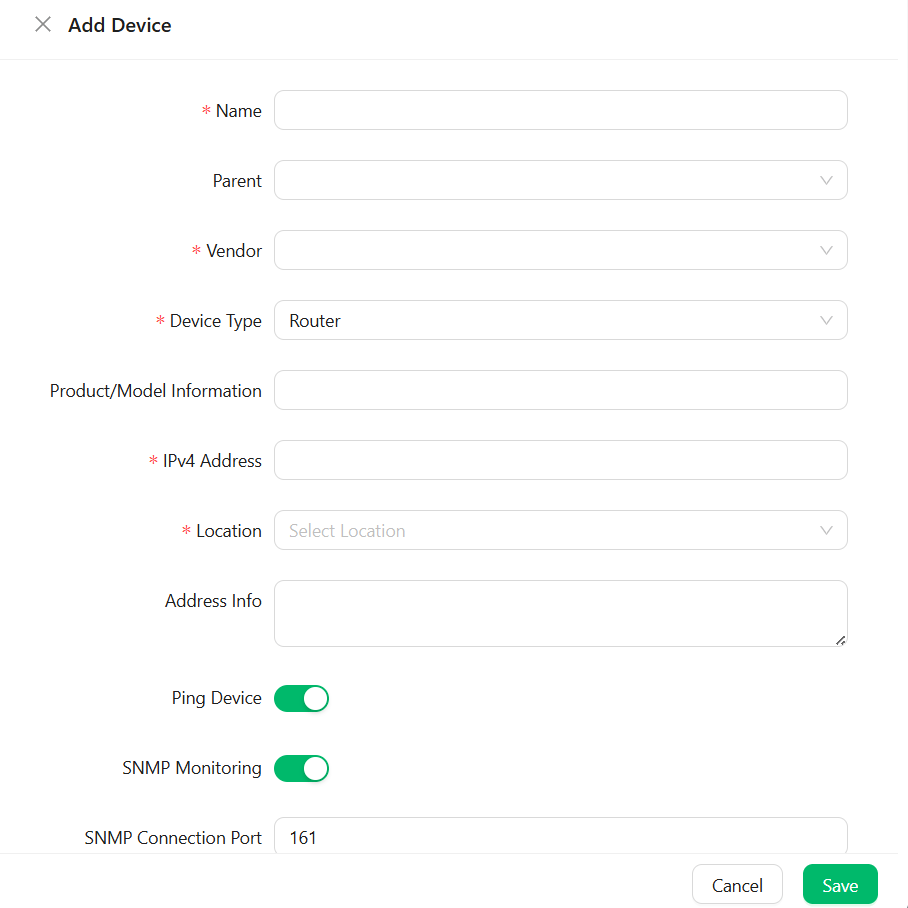 | Field | Description |
| ------------------------- | --------------------------------------------------------------------------------------------- |
| **Name**\* | A label for this device |
| Parent | An optional parent device, for nested/dependent device hierarchies |
| **Vendor**\* | The device manufacturer (e.g. Mikrotik) |
| **Device Type**\* | Router, Switch, AP, etc. — defaults to **Router** |
| Product/Model Information | Free-text field for the specific model |
| **IPv4 Address**\* | The device's management IP |
| **Location**\* | The location this device is deployed at |
| Address Info | Optional notes on the device's physical placement |
| Ping Device | Toggle on to have SoftISP periodically ping this device for reachability (enabled by default) |
| SNMP Monitoring | Toggle on to enable SNMP-based monitoring (enabled by default) |
| SNMP Connection Port | The SNMP port to connect on — defaults to `161` |
Click **Save** to register the device.
Fields marked with an asterisk (\*) — Name, Vendor, Device Type, IPv4 Address, and Location — are required. The form won't save without them.
Use [Device Groups](/settings/device-groups) to organize devices by zone or technology type for easier bulk management.
| Field | Description |
| ------------------------- | --------------------------------------------------------------------------------------------- |
| **Name**\* | A label for this device |
| Parent | An optional parent device, for nested/dependent device hierarchies |
| **Vendor**\* | The device manufacturer (e.g. Mikrotik) |
| **Device Type**\* | Router, Switch, AP, etc. — defaults to **Router** |
| Product/Model Information | Free-text field for the specific model |
| **IPv4 Address**\* | The device's management IP |
| **Location**\* | The location this device is deployed at |
| Address Info | Optional notes on the device's physical placement |
| Ping Device | Toggle on to have SoftISP periodically ping this device for reachability (enabled by default) |
| SNMP Monitoring | Toggle on to enable SNMP-based monitoring (enabled by default) |
| SNMP Connection Port | The SNMP port to connect on — defaults to `161` |
Click **Save** to register the device.
Fields marked with an asterisk (\*) — Name, Vendor, Device Type, IPv4 Address, and Location — are required. The form won't save without them.
Use [Device Groups](/settings/device-groups) to organize devices by zone or technology type for easier bulk management.