

Payments By Channel
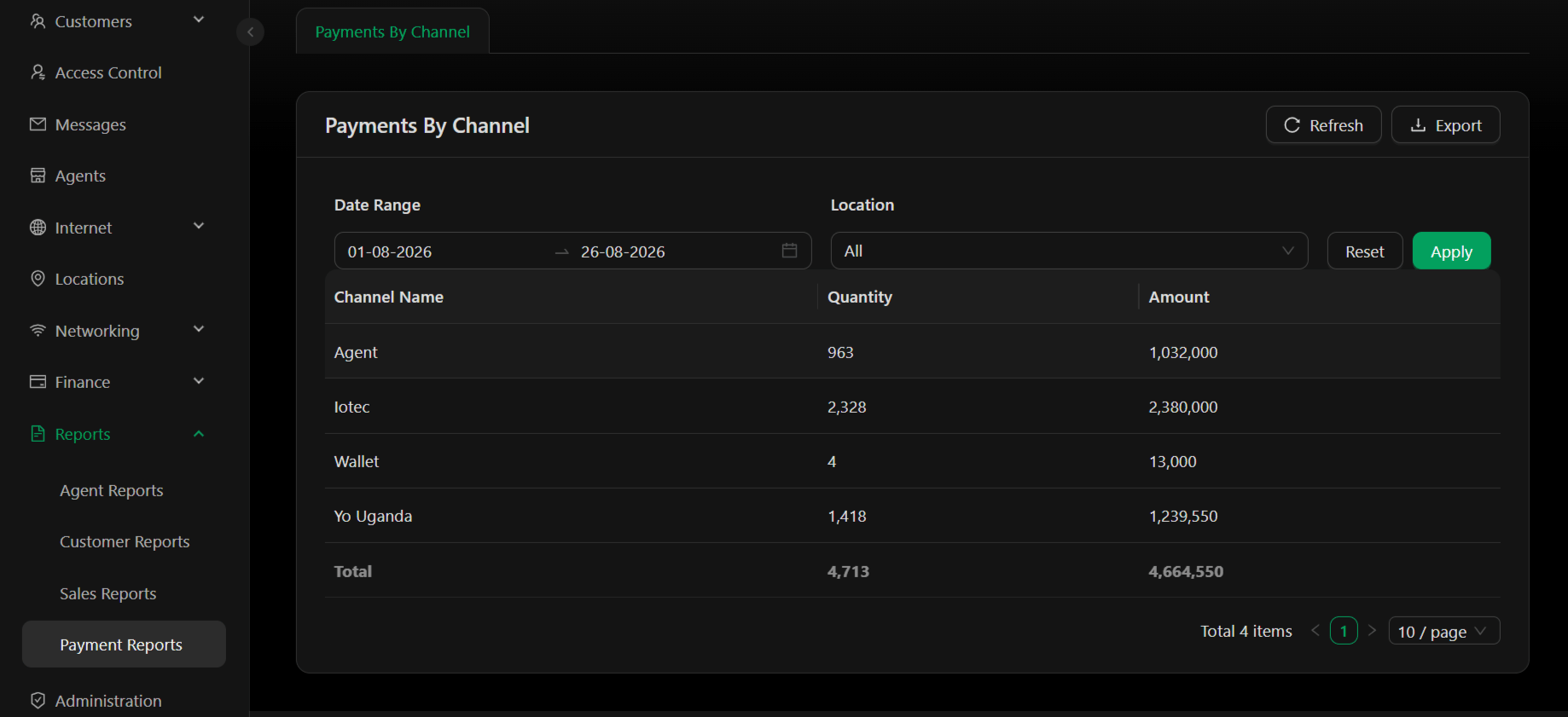
Example Data (01-08-2026 to 26-08-2026):
Filters:
- Date Range – Select start and end dates to view payment data for a specific period
- Location – Filter by specific location or select “All” for all locations
- Identify which payment channels are most popular with customers
- Monitor transaction volumes across different collection methods
- Spot underutilized payment channels that may need promotion
- Verify payment collection totals against invoice data
- Plan payment infrastructure upgrades based on channel usage
Key Metrics
Channel Volume – The Quantity column shows transaction count per channel. Higher volumes indicate channel adoption. Channel Revenue – The Amount column shows total money collected per channel. Compare this to volume to understand average transaction size per channel. Channel Mix – Calculate percentage contribution: (Channel Amount ÷ Total Amount) × 100 Example from report:- Iotec: 2380000 ÷ 4664550 = 51% of total payments
- Yo Uganda: 1239550 ÷ 4664550 = 27% of total payments
- Agent: 1032000 ÷ 4664550 = 22% of total payments
- Wallet: 13000 ÷ 4664550 = less than 1% of total payments
Actions
- Refresh – Reload report data to see latest payment figures
- Export – Download report as Excel file for reconciliation, analysis, or accounting records
Use Cases
- Channel Performance – Identify which payment methods customers prefer and which generate the most revenue
- Payment Method Optimization – If one channel dominates (like Iotec at 51%), consider whether other channels are truly competitive
- Reconciliation – Cross-check payment report totals against invoice totals to ensure all customer payments are captured
- Collection Verification – Confirm that expected payment amounts are flowing through proper channels
- Capacity Planning – Allocate resources and infrastructure support based on channel volume and importance
- Customer Analysis – Understand payment behavior patterns by channel and location
Common Questions
Why is one channel dominating? Review your payment method setup. Customers may default to the easiest or most visible option. Consider whether other channels need better promotion or easier access. How do I reconcile Payment Reports with Transactions? Payment Reports show by-channel volume and totals. Cross-reference with the Payment Logs in Transactions for detailed transaction-level data. Should I add or remove payment channels? Use this report to inform that decision. High-volume, high-value channels are critical. Very low-volume channels (like Wallet at less than 1%) may be retired if they complicate operations.Tip: Export this report monthly alongside your Invoice report to reconcile total payments collected against total invoiced.Note: For detailed transaction-level payment data, see Transactions. For agent-specific collection metrics, see Agent Reports.